> ## Documentation Index
> Fetch the complete documentation index at: https://developers.respondent.io/llms.txt
> Use this file to discover all available pages before exploring further.
# Audience Quotas (V1)
> Create, read, and update a V1 quota on /v1/projects/{projectId}/quota, and delete whichever quota the project has.
New quotas use [Audience Quotas](/docs/Projects/audience-quotas) (`version: "v2"`) on `/quotas`. This page is the V1 API on `/quota`: [create](/quotas/create-quota-v1), [retrieve](/quotas/retrieve-quota-v1), [update](/quotas/update-quota-v1), and [delete](/quotas/delete-quota-v1). Delete removes the quota that is configured, V1 or V2.
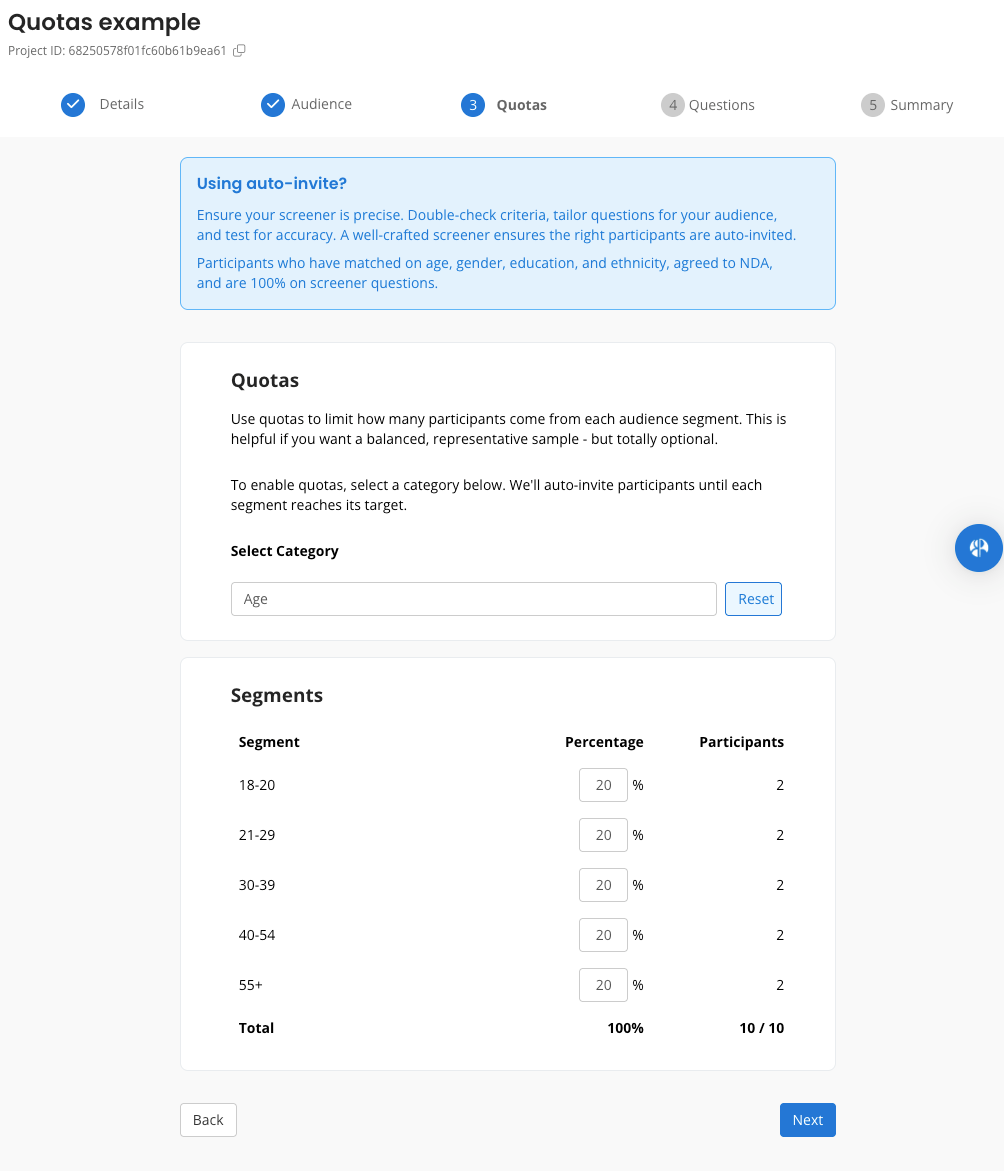
Use quota endpoints to limit how many participants come from each audience segment. This is helpful if you want a balanced, representative sample - but totally optional.
We currently support only one quota per project, based on demographic categories.
`GET /v1/projects/{projectId}/quotas` still returns the body on this page when the stored quota is V1. `GET /v1/projects/{projectId}/quota` is the V1 read. A project with no V1 quota, including a project that only has a V2 quota, returns **204 No Content** on `/quota`. The V2 read stays on `/quotas`, which returns `200` and `{ version: "v2", groups: [] }` when the project has no quota.
`PUT /v1/projects/{projectId}/quota` is a V2 alias of `PUT /quotas`. A V1 body sent there is a `400`. Create a V1 quota with `POST`.
## Quota Categories
The following demographic fields are supported in v1:
| Field | Examples |
| - | - |
| gender | `female`, `male`, `other` |
| age | `18-20`, `21-29`, `30-39` |
| ethnicity | `americanindianalaskannative`, `hispaniclatino`, `blackorafricanamerican` |
| location (Country Code ISO 3166-1 alpha-2) | `US`, `GB`, `BR` |
Those cells are examples. A segment `value` has to belong to the `category`. Also accepted: gender `nonbinary`, `transmale`, `transfemale`, `prefernottoanswer`; age `40-54`, `55+`; ethnicity `asianpacificislander`, `whitecaucasian`, `middleeastern`, `multipleethnicity`, `prefernotdisclose`. `N/A` is excluded. Location excludes `all` (worldwide).
Each `percentage` is a whole number from 0 to 100, and the segments sum to 100. `totalTarget` is the project's number of participants, and it has to be at least the number of segments.
## Eligibility Constraints
* Project methodology must be `unmoderatedStudy`, `survey`, or `diaryStudy`
* Auto-invite must be enabled
* Quotas must be defined before the project is published and can't be edited once the project has been published (the project has to be a draft)
## Sample Workflow
1. Create an unmoderated study, survey, or diary study with auto-invite enabled via [POST /v1/projects](/projects/create-a-project).
2. Define quotas with POST /v1/projects/\{projectId}/quota.
3. Publish project - we will match and invite participants based on your desired quota segments.
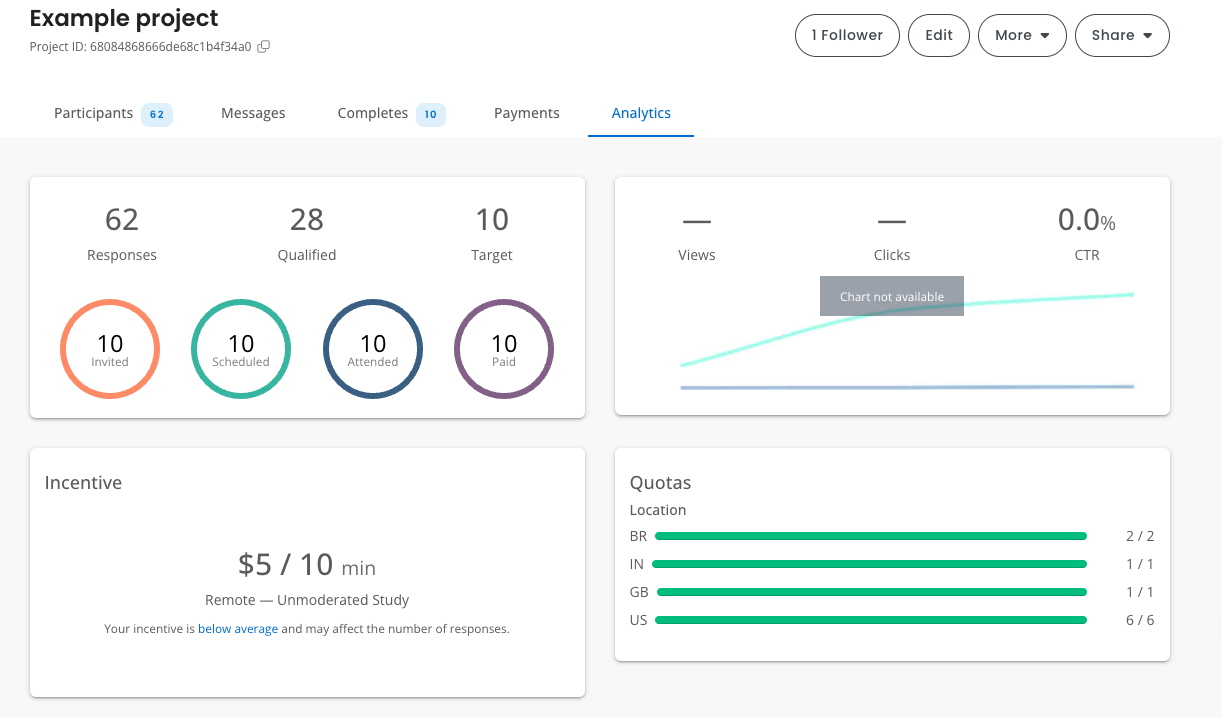
4. Monitor fill progress with GET /v1/projects/\{projectId}/quota
## Creating quotas
POST /v1/projects/\{projectId}/quota
Returns `201`. A second POST for a project that already has a V1 quota returns that quota.
```Text Example request theme={null}
{
"version": "v1",
"criteria": {
"category": "gender",
"segments": [
{
"value": "male",
"percentage": 50
},
{
"value": "female",
"percentage": 50
}
]
}
}
```
```Text Example response theme={null}
{
"id": "68086546545de68c1bc1bc1b",
"projectId": "68084868666de68c1b4f3412",
"version": "v1",
"totalTarget": 10,
"status": "IN_PROGRESS",
"criteria": {
"category": "gender",
"segments": [
{
"id": "1",
"value": "male",
"percentage": 50
},
{
"id": "2",
"value": "female",
"percentage": 50
}
]
},
"progress": {
"1": {
"currentCount": 0,
"targetCount": 5
},
"2": {
"currentCount": 0,
"targetCount": 5
}
},
"createdAt": "2025-05-15T03:44:44.482Z",
"updatedAt": "2025-05-15T03:44:44.482Z"
}
```
`totalTarget` comes from the project. The platform assigns segment ids `"1"`, `"2"`, and so on. `progress` is a map of those ids. `status` is `IN_PROGRESS` or `FILLED`.
## Monitoring quota fill rates
GET /v1/projects/\{projectId}/quota
Returns **204 No Content** if no V1 quota has been set.
```Text Example response theme={null}
{
"id": "68086546545de68c1bc1bc1b",
"projectId": "68084868666de68c1b4f3412",
"version": "v1",
"totalTarget": 10,
"status": "IN_PROGRESS",
"criteria": {
"category": "gender",
"segments": [
{
"value": "male",
"percentage": 50,
"id": "1"
},
{
"value": "female",
"percentage": 50,
"id": "2"
}
]
},
"progress": {
"1": {
"currentCount": 2,
"targetCount": 5
},
"2": {
"currentCount": 1,
"targetCount": 5
}
},
"createdAt": "2025-05-15T03:44:44.482Z",
"updatedAt": "2025-05-15T03:44:44.482Z"
}
```
## Updating quotas
PATCH /v1/projects/\{projectId}/quota
Send `version` and `criteria`. The segments replace the ones on the quota, and the target counts are recalculated from the project's number of participants. Returns `200` and the same body as GET. Returns `404` when the project has no V1 quota.
## Deleting quotas
DELETE /v1/projects/\{projectId}/quota
Removes the quota configured on the project. Returns `204`. A project with no quota also returns `204`.
A V1 quota is removed while the project is a draft. A project that is no longer a draft returns `400`.
A V2 quota is removed including after publish, and Quotas V2 does not have to be enabled for the organization.
[DELETE /quotas](/quotas/delete-quota) removes a V2 quota. While a V1 quota is stored, that route returns `409`, or `403` when Quotas V2 is not enabled for the organization.
## References
Example of how quotas are created via the Respondent Researcher Platform
 Example of how fill progress is presented in the Respondent Researcher Platform
 This documentation is built and hosted on [Mintlify](https://mintlify.com), a developer documentation platform.