> ## Documentation Index
> Fetch the complete documentation index at: https://developers.respondent.io/llms.txt
> Use this file to discover all available pages before exploring further.
# Scheduling
> How to schedule for moderated projects
# When and how to use scheduling
Scheduling endpoints are applicable for the following methodologies: `oneOnOne`, `focusGroup`, `inRespondentHome`, `inRespondentOffice`.
## Where to start
Scheduling begins with [project creation](/projects/create-a-project). When one of the above methodologies is select for a project, the `bookingURL` field in the `externalResearcher` object is required to schedule with participants. The link provided should lead participants to a page where they can select a time to participate in the study. The booking page should not require a participant to enter email or phone number and should instead rely on the data passed in the redirect URL parameters to associate the schedule with the appropriate participant: `?respondent_profile_id={{%PROFILE_ID%}}&respondent_project_id={{%PROJECT_ID%}}&respondent_screener_response_id={{%SCREENER_RESPONSE_ID%}}`
 ## Inviting participants
Before a participant has the opportunity to book time they must first be invited to the project via: [`/v1/projects/{projectId}/screener-responses/{screenerResponseId}/invite`](/screener-responses/invite-participant)
## Scheduling participants
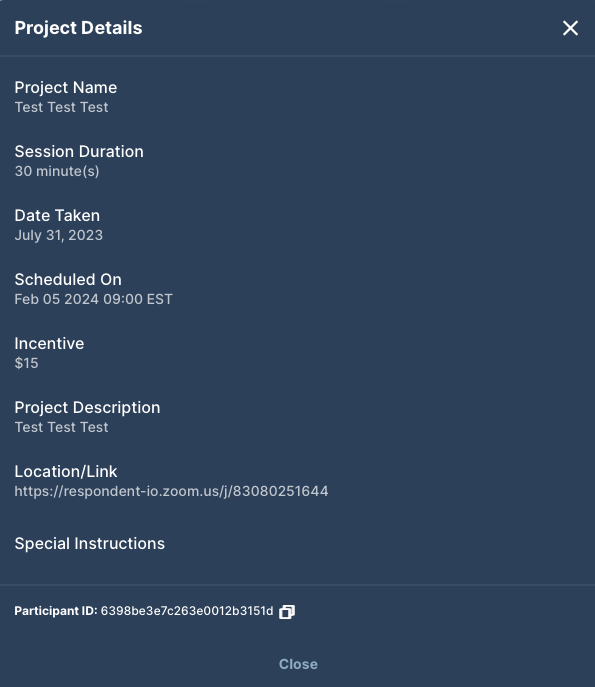
Once a participant has been invited, they will be able to follow the "Book a Time" button to scheduled a time on your platform. Once the participant has confirmed a time the schedule endpoint,[`/v1/projects/{projectId}/screener-responses/{screenerResponseId}/schedule`](/screener-responses/schedule-participant), should be utilized to send Respondent the booking information to keep the participant informed.
**Set `bookingLink` to your *reschedule* URL when calling the schedule endpoint.** The `bookingLink` you pass to `/schedule` becomes the participant's **reschedule link** (surfaced in their booking confirmation and in the "Reschedule" action on their dashboard). If your platform uses a *different* URL for rescheduling than for the initial booking, pass your **reschedule** URL as `bookingLink` on the schedule call — the initial booking link was already used at invite time to get them booked.
Related fields on `/schedule`: `meetingLink` is the session/meeting URL, and `meetingCancelLink` is the cancel link. If `meetingCancelLink` is omitted it falls back to `bookingLink` (then to the project's `externalResearcher.bookingURL`), so pass it explicitly if your cancel URL differs from your reschedule URL.
## Inviting participants
Before a participant has the opportunity to book time they must first be invited to the project via: [`/v1/projects/{projectId}/screener-responses/{screenerResponseId}/invite`](/screener-responses/invite-participant)
## Scheduling participants
Once a participant has been invited, they will be able to follow the "Book a Time" button to scheduled a time on your platform. Once the participant has confirmed a time the schedule endpoint,[`/v1/projects/{projectId}/screener-responses/{screenerResponseId}/schedule`](/screener-responses/schedule-participant), should be utilized to send Respondent the booking information to keep the participant informed.
**Set `bookingLink` to your *reschedule* URL when calling the schedule endpoint.** The `bookingLink` you pass to `/schedule` becomes the participant's **reschedule link** (surfaced in their booking confirmation and in the "Reschedule" action on their dashboard). If your platform uses a *different* URL for rescheduling than for the initial booking, pass your **reschedule** URL as `bookingLink` on the schedule call — the initial booking link was already used at invite time to get them booked.
Related fields on `/schedule`: `meetingLink` is the session/meeting URL, and `meetingCancelLink` is the cancel link. If `meetingCancelLink` is omitted it falls back to `bookingLink` (then to the project's `externalResearcher.bookingURL`), so pass it explicitly if your cancel URL differs from your reschedule URL.

 ## Rescheduling
Rescheduling is acceptable up to 4 hours before a scheduled event. After that time if a participant cannot meet a new time requirement and needs to cancel, they will be considered "completed/attended" and incentive will be extracted for payment.
Rescheduling prior to the 4 hour window can be accomplished via: [`/v1/projects/{projectId}/screener-responses/{screenerResponseId}/cancel-booking-reinvite`](/screener-responses/cancel-booking-&-re-invite)
This simply moves the participant back to their original "invited" status.
## Cancelling
Cancelling is acceptable up to 4 hours before a scheduled event. After that time a participant will be considered "completed/attended" and incentive will be extracted for payment.
Cancelling prior to the 4 hours window can be accomplished via: [`/v1/projects/{projectId}/screener-responses/{screenerResponseId}/cancel-booking`](/screener-responses/cancel-booking)
## Rescheduling
Rescheduling is acceptable up to 4 hours before a scheduled event. After that time if a participant cannot meet a new time requirement and needs to cancel, they will be considered "completed/attended" and incentive will be extracted for payment.
Rescheduling prior to the 4 hour window can be accomplished via: [`/v1/projects/{projectId}/screener-responses/{screenerResponseId}/cancel-booking-reinvite`](/screener-responses/cancel-booking-&-re-invite)
This simply moves the participant back to their original "invited" status.
## Cancelling
Cancelling is acceptable up to 4 hours before a scheduled event. After that time a participant will be considered "completed/attended" and incentive will be extracted for payment.
Cancelling prior to the 4 hours window can be accomplished via: [`/v1/projects/{projectId}/screener-responses/{screenerResponseId}/cancel-booking`](/screener-responses/cancel-booking)
 ***
***