> ## Documentation Index
> Fetch the complete documentation index at: https://developers.respondent.io/llms.txt
> Use this file to discover all available pages before exploring further.
# Applying skip logic
> Using logic options with radio and checkbox questions
Both `radio` and `checkbox` questions can include skip logic, but each question utilizes a slightly different means of achieving the logic given the granularity of logic available.
For skip logic to be applied, other questions must already be created or you can pass your own UUID-format uid in the PUT Bulk endpoint
* Question IDs are returned when a screener question is created. Once created, the question `uid` can be used to determine skip logic. End of survey will create its own `uid` automatically when you set the `goToQuestionUid` as `null` in the skip logic object.
# Radio skip logic
PATCH: /v1/projects/\{projectId}/screener-questions/\{screenerQuestionId}
Radio skip logic allows for one additional layer of logic to be applied to each answer beyond Qualified (1) or Disqualified (2); the additional logic layer can designate which question a participant moves to based on the answer. For this example we'll use the sample question from basic screener question setup and apply skip logic.
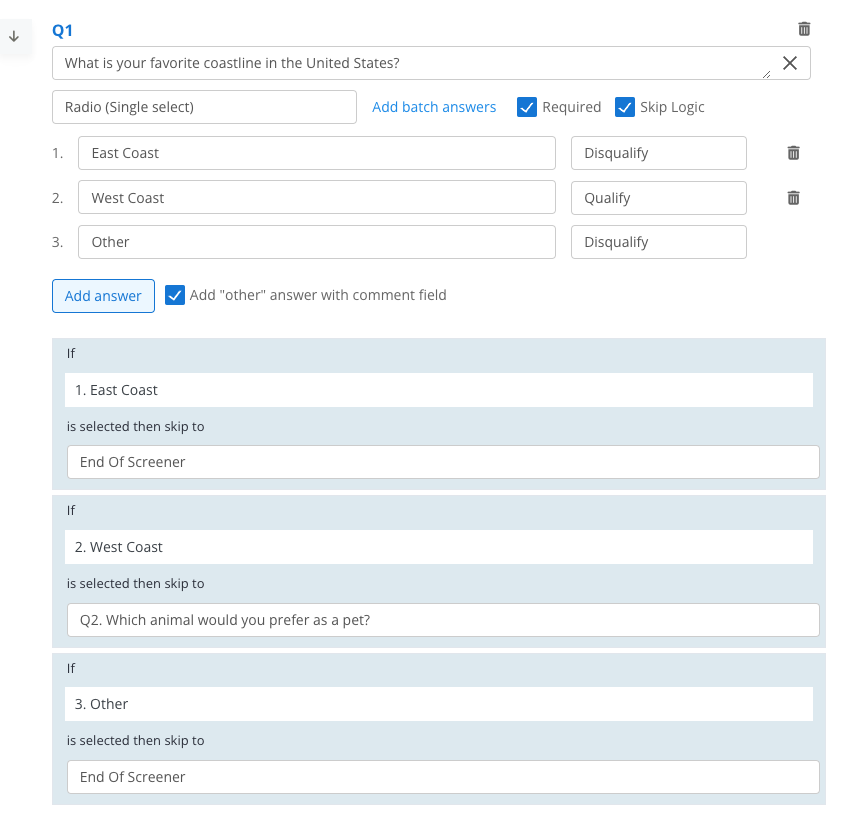 * The applied skip logic dictates that if East Coast or Other are selected, the participant moves to the end of the screener. If West Coast is selected, the participant moves to another question.
* This logic is applied by marking `skipLogic` = `true` and utilizing the `goToQuestionUid` field in the answer object. Setting the `goToQuestionUid` to `null` will automatically apply the End of Screener uid that we generate.
```json Radio with skip logic theme={null}
{
"questionType": "radio",
"text": "What is your favorite coastline in the United States?",
"answers": [
{
"text": "East Coast",
"answerValue": 2,
"goToQuestionUid": null
},
{
"text": "West Coast",
"answerValue": 1,
"goToQuestionUid": "DISTINCT_QUESTION_UID"
},
{
"isOther": true,
"text": "Other",
"answerValue": 2,
"goToQuestionUid": null
}
],
"skipLogic": true,
"includeOtherOption": true,
"isRequired": true
}
```
***
# Checkbox skip logic
PATCH: /v1/projects/\{projectId}/screener-questions/\{screenerQuestionId}
Checkbox skip logic allows for one or multiple layers of logic to be applied using AND/OR booleans beyond the answer level logic of May Select (1), Must Select (2), Disqualify (3). For both examples we'll use the sample question from basic screener question setup and apply skip logic.
## Single logic type
* The applied skip logic dictates that if East Coast or Other are selected, the participant moves to the end of the screener. If West Coast is selected, the participant moves to another question.
* This logic is applied by marking `skipLogic` = `true` and utilizing the `goToQuestionUid` field in the answer object. Setting the `goToQuestionUid` to `null` will automatically apply the End of Screener uid that we generate.
```json Radio with skip logic theme={null}
{
"questionType": "radio",
"text": "What is your favorite coastline in the United States?",
"answers": [
{
"text": "East Coast",
"answerValue": 2,
"goToQuestionUid": null
},
{
"text": "West Coast",
"answerValue": 1,
"goToQuestionUid": "DISTINCT_QUESTION_UID"
},
{
"isOther": true,
"text": "Other",
"answerValue": 2,
"goToQuestionUid": null
}
],
"skipLogic": true,
"includeOtherOption": true,
"isRequired": true
}
```
***
# Checkbox skip logic
PATCH: /v1/projects/\{projectId}/screener-questions/\{screenerQuestionId}
Checkbox skip logic allows for one or multiple layers of logic to be applied using AND/OR booleans beyond the answer level logic of May Select (1), Must Select (2), Disqualify (3). For both examples we'll use the sample question from basic screener question setup and apply skip logic.
## Single logic type
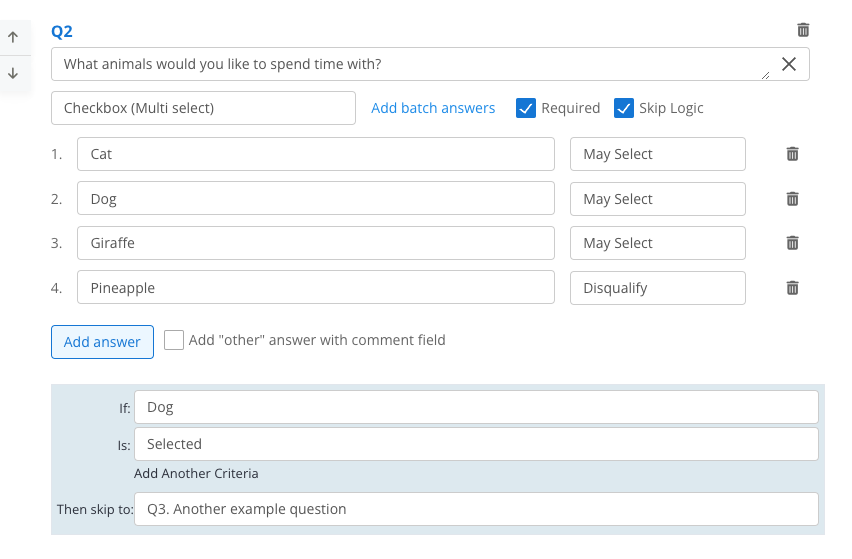 * The applied skip logic dictates that if Dog is selected (`answerUid`) to skip to a particular question via the `goToQuestionUid` in the logic object.
```json skipLogicType theme={null}
{
"questionType": "checkbox",
"text": "What animals would you like to spend time with?",
"answers": [
{
"text": "Cat",
"answerValue": 1
},
{
"text": "Dog",
"answerValue": 1
},
{
"text": "Giraffe",
"answerValue": 1
},
{
"text": "Pineapple",
"answerValue": 3
}
],
"isRequired": true,
"skipLogic": true,
"includeOtherOption": false,
"logic": {
"answerUid": "DOG_ANSWER_ID",
"goToQuestionUid": "DISTINCT_QUESTION_UID",
"skipLogicType": {
"text": "Selected",
"id": "1"
},
"multipleAnswers": null,
"multipleAnswersBoolType": null
},
}
```
## Multiple answer logic
* The applied skip logic dictates that if Dog is selected (`answerUid`) to skip to a particular question via the `goToQuestionUid` in the logic object.
```json skipLogicType theme={null}
{
"questionType": "checkbox",
"text": "What animals would you like to spend time with?",
"answers": [
{
"text": "Cat",
"answerValue": 1
},
{
"text": "Dog",
"answerValue": 1
},
{
"text": "Giraffe",
"answerValue": 1
},
{
"text": "Pineapple",
"answerValue": 3
}
],
"isRequired": true,
"skipLogic": true,
"includeOtherOption": false,
"logic": {
"answerUid": "DOG_ANSWER_ID",
"goToQuestionUid": "DISTINCT_QUESTION_UID",
"skipLogicType": {
"text": "Selected",
"id": "1"
},
"multipleAnswers": null,
"multipleAnswersBoolType": null
},
}
```
## Multiple answer logic
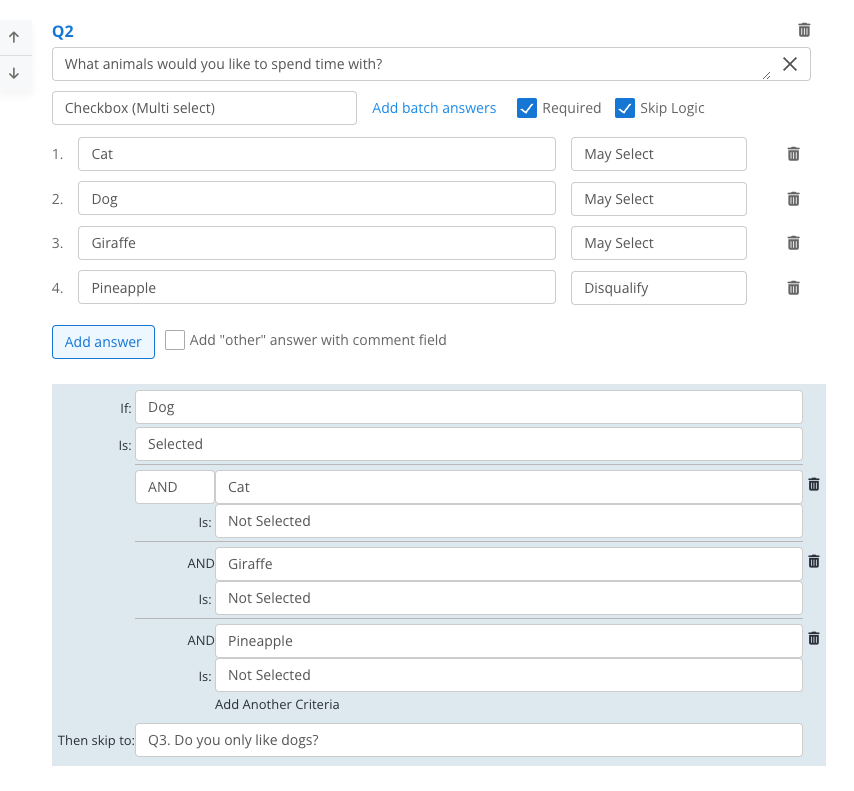 * The applied logic dictates that if Dog is Selected (`answerUid`) AND Cat is Not Selected AND Giraffe is Not Selected AND Pineapple is Not Selected to skip to a particular question via the `goToQuestionUid` in the logic object.
* Either AND/OR logic can be applied for a string of multiple answers, but only one at a time can be applied via `multipleAnswersBoolType`.
For `skipLogicType.id` and `multipleAnswers.id`
* Selected = 1, Not Selected = 2
For `multipleAnswersBoolType.id`
* AND = 1, OR = 2
```json multipleAnswers theme={null}
{
"questionType": "checkbox",
"text": "What animals would you like to spend time with?",
"answers": [
{
"text": "Cat",
"answerValue": 1
},
{
"text": "Dog",
"answerValue": 1
},
{
"text": "Giraffe",
"answerValue": 1
},
{
"text": "Pineapple",
"answerValue": 3
}
],
"isRequired": true,
"skipLogic": true,
"includeOtherOption": false,
"logic": {
"answerUid": "DOG_ANSWER_ID",
"goToQuestionUid": "DISTINCT_QUESTION_UID",
"skipLogicType": {
"text": "Selected",
"id": "1"
},
"multipleAnswersBoolType": {
"text": "AND",
"id": "1"
},
"multipleAnswers": [
{
"answer": "CAT_ANSWER_ID",
"logicType": {
"text": "Not Selected",
"id": "2"
}
},
{
"answer": "GIRAFFE_ANSWER_ID",
"logicType": {
"text": "Not Selected",
"id": "2"
}
},
{
"answer": "PINEAPPLE_ANSWER_ID",
"logicType": {
"text": "Not Selected",
"id": "2"
}
},
]
},
}
```
***
* The applied logic dictates that if Dog is Selected (`answerUid`) AND Cat is Not Selected AND Giraffe is Not Selected AND Pineapple is Not Selected to skip to a particular question via the `goToQuestionUid` in the logic object.
* Either AND/OR logic can be applied for a string of multiple answers, but only one at a time can be applied via `multipleAnswersBoolType`.
For `skipLogicType.id` and `multipleAnswers.id`
* Selected = 1, Not Selected = 2
For `multipleAnswersBoolType.id`
* AND = 1, OR = 2
```json multipleAnswers theme={null}
{
"questionType": "checkbox",
"text": "What animals would you like to spend time with?",
"answers": [
{
"text": "Cat",
"answerValue": 1
},
{
"text": "Dog",
"answerValue": 1
},
{
"text": "Giraffe",
"answerValue": 1
},
{
"text": "Pineapple",
"answerValue": 3
}
],
"isRequired": true,
"skipLogic": true,
"includeOtherOption": false,
"logic": {
"answerUid": "DOG_ANSWER_ID",
"goToQuestionUid": "DISTINCT_QUESTION_UID",
"skipLogicType": {
"text": "Selected",
"id": "1"
},
"multipleAnswersBoolType": {
"text": "AND",
"id": "1"
},
"multipleAnswers": [
{
"answer": "CAT_ANSWER_ID",
"logicType": {
"text": "Not Selected",
"id": "2"
}
},
{
"answer": "GIRAFFE_ANSWER_ID",
"logicType": {
"text": "Not Selected",
"id": "2"
}
},
{
"answer": "PINEAPPLE_ANSWER_ID",
"logicType": {
"text": "Not Selected",
"id": "2"
}
},
]
},
}
```
***